User Login done right
Today I was involved in an estimation session when the issue of user login came up. I was reminded of how such a straightforward piece of functionality can actually be rather tricky to implement correctly. (An estimation session is where we look at a list of features and try to assign a relative complexity to each)
The humble user login – implemented in every single website on earth, but what is the right way? If you’re wondering what the hell I’m going on about, let’s look at a few examples. It’s pretty straightforward to figure out what should happen when I supply the correct username and password, but what should happen when I supply the incorrect credentials?
Let’s take a look at how a few popular sites handle this. First up, Gmail.
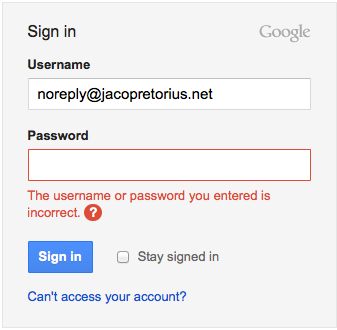
Here I used an e-mail address (username) that doesn’t exist. I get the exact same message when I use my actual e-mail address with an incorrect password.
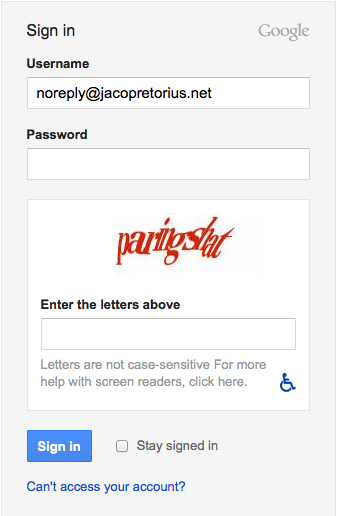
If I do this a few times I get prompted to complete a captcha test.
Let’s contrast this with another site you might have heard of – Facebook.
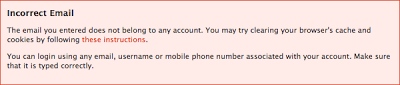
That’s the message I get when I supply an e-mail address (username) that doesn’t exist. When I supply my actual e-mail address with an incorrect password, I get a different message.

As far as I can tell I can try a password as many times as I like – I never get prompted for a captcha or get my account locked.
What’s the difference?
What’s the difference between how these sites handle incorrect credentials? I never realized this until I attended a seminar on web security, but Facebook is actually doing something called ‘information leakage’. By telling you that your password is incorrect, Facebook is implicitly telling you that the username (e-mail address) you entered exists.
Think of it from the perspective of a hacker – to get access to someone’s account you would need to know both their username and password. If I wanted access to a host of Facebook accounts, I would simply guess a whole bunch of usernames and test them against the login system. Since Facebook would implicitly tell me which of those are real usernames, I could then try a list of the most common passwords against only the real usernames. Since the Facebook username is in fact an e-mail address I could also validate a whole list of e-mail addresses to be targeted for spam.
That’s why the message Gmail provides is actually quite clever – they don’t leak any information – they only tell me that the username and password combination doesn’t exist. Gmail doesn’t implicitly tell me anything else and I have no idea of knowing whether or not the username actually exists.
Is Facebook wrong and Gmail right?
In a word, no. While Facebook does leak information about usernames it does make the user experience a bit nicer – you never have to struggle to figure out whether or not you have the right username. While it does leave them vulnerable to certain attacks they probably felt that it was justified to be able to provide an easier user experience.
I don’t think there is necessarily a right way of doing this, but I do think it’s very important to understand what the different options imply.
Locking an account after a certain number of attempts
What you should really watch out for is locking an account after a certain number of attempts. For example, you may decide that if a user enters his/her password incorrectly 10 times you would lock their account. While this may seem like a good idea, if I know your username I can very easily lock your account. Again, you might think that this isn’t the worst thing – the user might simply need to reset their password using a linked e-mail account. However, if you combine this with information leakage it could potentially have very bad results for your website.
For example, let’s say Facebook decides that after 10 invalid password attempts a user’s account is locked and they are forced to reset their password. A hacker might use the fact that Facebook tells you which usernames are valid to build up a large database of valid usernames. Using the lockout facility a hacker could then lock the accounts of all these users on a single day.
Imagine 100 000 Facebook users get their accounts locked on a single day – not only might they lose some existing users and deter new users from joining, their reputation would take a massive hit. In the long term users might not feel comfortable supplying their credit card details on a site which had these kinds of issues in the past. All because of a simple login feature.
Conclusion
User login is a pretty straightforward piece of functionality, but it’s important that we understand the consequences of our different options. We might end up hurting our users by implementing features which are intended to help them.
Happy coding.