Debugging JavaScript errors
I have noticed that quite a few developers are unaware of one of the simplest methods of finding JavaScript errors in your page. JavaScript exposes an event handler that fires whenever a JavaScript error occurs in a page. Using it we can suppress all JavaScript errors on the page or display an error dialog.
Example
Here is an example of using the onerror event:
<script type="text/javascript">
    window.onerror = function(msg, url, line) {
        alert("JavaScript error: " + msg + " on line " + line);
    }
</script>
Now if we make an obvious error like the following…
<script type="text/javascript">
    document.write("this should produce an error"
</script>
we’ll get a nice detailed error message.
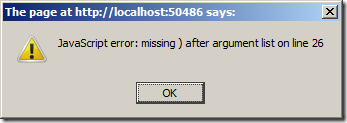
This works in Firefox 3 and IE 7. For some reason this doesn’t work in Chrome (v2.0.172.37). If you can shed some light on why this doesn’t work in Chrome please do so in the comments section below.
Keep in mind that you shouldn’t deploy this type of error handling into a production server – you might think about using a compiler directive so that the code only exists in Debug mode.
Happy coding.